


6 Best AI Outfit Generators: Top Virtual Try-On Apps & Tools

2026/08/07

- 6 Best AI Clothes Changer Websites and Apps to Try
- AI Clothes Changing FAQ
- Try GenApe as an AI Clothes Changer Online
Ever found an outfit online that looks great on the model, but wondered whether it would actually suit you? An AI Clothes Changer can help you preview the look before buying. With AI clothes changing technology, you can upload a photo and replace the clothing in seconds without having to imagine the result yourself. Many AI dressup tools now let you try different outfits, styles, and colors with just a few clicks. In this guide, we’ll introduce six useful AI clothing replacer websites and apps so you can experiment with a virtual AI tool and see how different outfits might look on you.
6 Best AI Clothes Changer Websites and Apps to Try
AI-powered image editing has made virtual try-ons much easier. Instead of visiting a store or manually editing a photo, you can now use an AI Clothes Changer online to test different looks from your computer or phone. Below are six tools that make cloth swapping simple, whether you want to preview an online purchase, explore a new style, or create outfit images for content and e-commerce.
GenApe
GenApe is an all-in-one AI workspace designed for e-commerce sellers, marketers, and content creators. It supports AI image generation, AI video creation, AI dressup, product visuals, and even ID photo generation in one platform. Its clothing swap features are especially useful when you want to place a specific garment on a model or create a dedicated AI product image for an online store. Here’s how to change clothes with GenApe:

Open the AI Product Image tool.
Upload the product you want the model to wear, along with the model photo and background.
Add extra prompt details if you want to refine the style, setting, fit, or overall visual direction.
Click Generate, then preview and download your AI outfit swap image.

PixPretty
PixPretty is an online AI dressup tool that lets you try different fashion styles without writing complicated prompts. Simply upload a photo and choose or provide the outfit you want to test.
It works well for previewing clothes before an online purchase, experimenting with OOTD combinations, or testing seasonal looks. The tool aims to preserve body shape, lighting, and fabric details while performing the outfit swap. Here’s how to use PixPretty:
Go to the website and open the AI clothes changing feature.
Upload a clear photo of yourself, preferably a full-body or half-body image.
Select or upload the clothing you want to try, such as streetwear, business attire, or formalwear.
Generate the image and download the finished clothing swap result.

*Supported platform: Web browser on desktop and mobile. PixPretty states that uploaded photos are protected and deleted after processing.
MyEdit
MyEdit is a practical AI clothes changing tool with a wide selection of outfit styles. Its AI fashion feature can replace clothing on both male and female subjects, with up to 24 preset outfit styles for women and 17 for men. Options range from understated luxury looks to casual everyday fashion, making it useful for anyone who wants to experiment with a new outfit before committing to it. Here’s how to use MyEdit:
Open the MyEdit website, choose the AI outfit feature, and click to get started.
Select a gender and choose the style you want to apply.
Upload your photo. MyEdit recommends using a half-body image and keeping hands away from the body for better results.
Wait a few seconds for the AI to generate your new outfit.
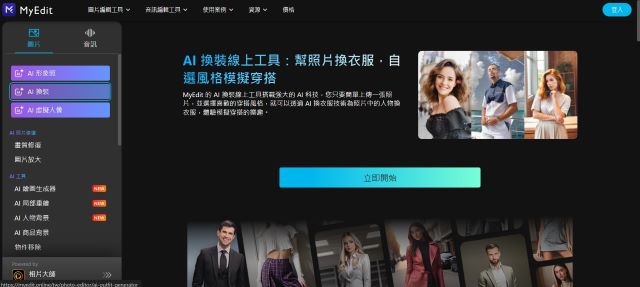
Image source: MyEdit official website
Picsart
Picsart is an online photo editor that includes a wide range of AI tools. Along with social media templates and creative editing features, it also offers AI Replace, which can work as an AI clothing replacer by letting you brush over an area and describe the new garment you want. Here’s how to use it for a cloth swap:
Open Picsart and select the AI Replace feature.
Upload the photo you want to edit.
Use the brush to mark the area of clothing you want to replace.
Enter a description of the new outfit in the prompt box.
Once you’re happy with the result, export and save the image.
*Supported platforms: Microsoft, Android, iOS
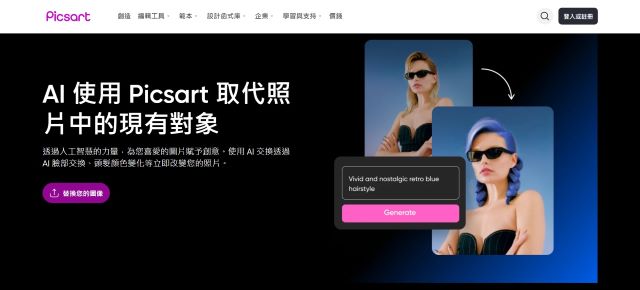
Image source: Picsart official website
PhotoDirector
PhotoDirector is a photo editing app that includes AI tools for changing outfits in portrait photos. Its virtual try-on feature also includes seasonal and themed clothing options, such as Japanese kimono looks or Christmas party outfits. This makes it useful for everyday fashion experiments as well as more creative dress swap ideas. Here’s how to use PhotoDirector for an outfit swap:
Open the PhotoDirector app and select the AI Try-On feature.
Select your gender and choose the outfit style you want to try.
Upload a clear full-body or half-body photo.
Tap Generate, then export and save the finished AI dressup image.
*Supported platforms: Microsoft, Android, iOS

Image source: PhotoDirector app
Vivid Glam
Vivid Glam combines beauty editing with several AI-powered photo tools. In addition to selfie retouching, it offers AI hairstyle and virtual try-on features that let you experiment with different looks without manually editing each area of the photo. Here’s how to use Vivid Glam for an outfit swap:
Open the AI Try-On feature.
Upload a personal photo.
Select your gender and preferred outfit style.
Wait for the image to generate, then download your new outfit photo.
*Supported platform: iOS

Image source: Vivid Glam Apple Store
AI Clothes Changing FAQ
These six AI dressup websites and apps make it much easier to preview different clothes without actually changing outfits. Still, the quality of an AI clothing swap can vary depending on the original photo, body position, garment design, and color contrast. Below are answers to some common questions that can help you get more natural results when using an AI Clothes Changer online.
What Are the Best AI Clothes Changer Websites?
In addition to the six tools covered above, YouCam and MyEdit are also popular options for online outfit changes. If you do not want to download another app, you can also upload a photo to ChatGPT or Gemini and describe the outfit you want with a prompt. For ID photos, however, it is better to keep the clothing formal and simple while avoiding unnecessary changes to the face. GenApe’s AI ID Photo template can also be used to create a more appropriate outfit based on your uploaded image and written instructions.
What Outfit Styles Can You Try With AI?
The available styles vary by tool, but common options include casual wear, sportswear, business outfits, dresses, formalwear, and seasonal looks. An outfit swap can be useful not only for virtual try-ons but also for exploring styles you would not normally wear and finding new fashion ideas.
How Can You Get Better AI Clothing Swap Results?
Avoid all-white outfits or clothing with overly complex patterns, layers, or details.
If you have long dark hair, avoid wearing an all-black top in the source image because the AI may confuse the hair with the garment during the clothing swap.
Choose a simple background and make sure the face and body are clearly visible.
Avoid blurry, low-resolution images or photos where large parts of the body are covered.
Try GenApe as an AI Clothes Changer Online
After using GenApe’s AI Image Generator to change clothes or create a new outfit, you can also turn the finished image into a short video with the AI Video Generator. GenApe brings together AI image creation, clothing swap tools, video generation, and social media copywriting in one workspace, making it useful for e-commerce sellers and content creators who want to go from product visuals to marketing content without constantly switching between different tools.
Start Using GenApe AI Now to Enhance Productivity and Creativity!
Collaborate with AI and accelerate your workflow!
Try Now- 1.6 Best AI Clothes Changer Websites and Apps to Try
- 2.AI Clothes Changing FAQ
- 3.Try GenApe as an AI Clothes Changer Online
Related Articles

8 Best AI Poster Generators in 2026 for Creating Posters Online
AI Poster Generators turn text and images into posters. This guide compares 8 tools by features and use cases.
Last Updated: 2026/08/03
6 Best AI Interior Design Tools for Easy Virtual Home Makeovers
Did you know that AI can now be applied to interior design? With the help of AI interior design tools, users can easily create interior design plans in just 30 seconds. Whether it's for interior design companies to showcase to clients or for individuals to present their home decoration ideas to designers, it’s all possible with simple usage that can simulate professional quality. This article will detail several practical home design AI apps and explain how to use them, allowing everyone to effortlessly create their ideal living space.
Last Updated: 2026/05/14
Best AI Girl Generator Online &Create AI Girl Images tutorial
Do you want to create AI girl images that match your aesthetic preferences? Creating AI beautiful girls is actually quite easy. All you need is a few AI Girl Generator Onlin or reference images to craft stunning images effortlessly! With the latest AI technology, your AI beauty images can now be incredibly lifelike. Let’s walk you through the process of generating AI beautiful women photos!
Last Updated: 2026/07/03

